Become A Certified TrialKit Administrator
TrialKit Academy is a self-paced learning environment where Administrators, Study Managers, and Builders can learn to utilize the TrialKit platform across its incredibly wide range of capabilities. Various courses offered are aimed at enabling Admins with the tools they need to fulfill a successful experience with TrialKit.
Training For Sites and Other Staff
TrialKit Academy does not support training for end users such as site Clinicians or Participants. To provide and/or track training for those users, we recommend leveraging the applicable help articles, like this one on data entry basics, and having those users log their training in the study Site Documents as covered in this section below.
Steps To Getting Certified As An Administrator or Builder
Submit a TrialKit Academy Registration request by emailing training@crucialdatasolutions.com
Go through the course in the TrialKit Academy self-paced learning portal
Complete the Certified TrialKit Basic Administrator exam with a passing score
Receive Certification for your own training records (and to post on your social channels like LinkedIn!)
Courses and Content
How To Access TrialKit Academy
After being registered in a course by the form linked above, the site can be accessed by signing into TrialKit and expanding the Account menu shown here:
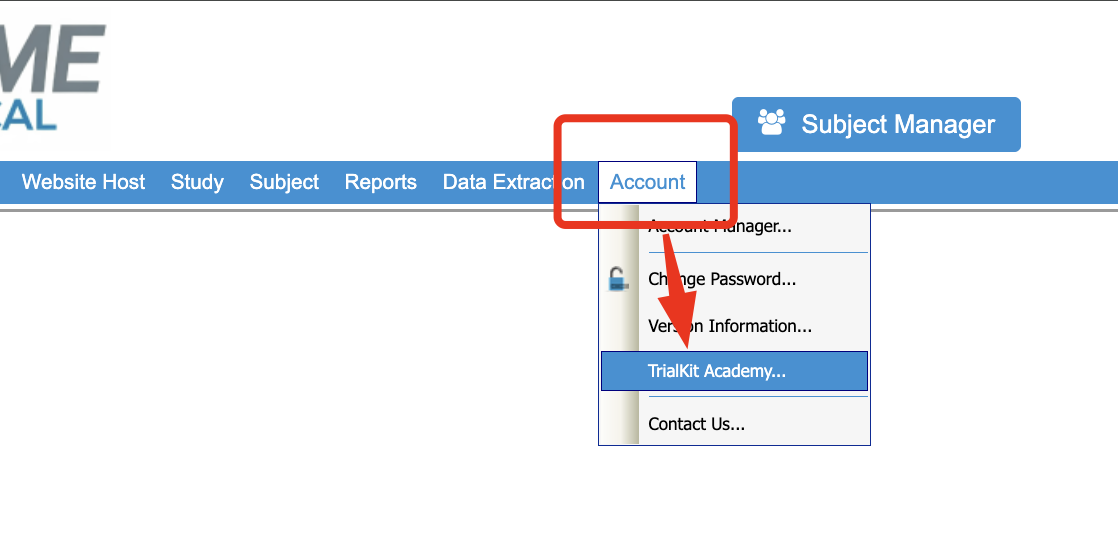
A new browser tab will open and log you in automatically based on matching email address. Note, TrialKit academy login is separate from your TrialKit login. Keep this in mind if ever changing credentials.
If the page does not open, this is because you are not registered for any courses, or the login could not authenticate. Use this link to go directly to TrialKit Academy and attempt a password reset with the same email address you use to access TrialKit.
.png "image(971).png")
Training For Site Staff and Other Non-Admin Users
TrialKit Academy is built for the Administrators and users that will be leveraging the configuration tools. For all other users like Investigators, Data Managers, Monitors, etc, there is a pre-built site document template for those users to read the applicable help articles in this knowledge base and sign off on their training.
Note
Availability depends on the study Administrator making this site document available to the users.
How to Log your training in Site Documents
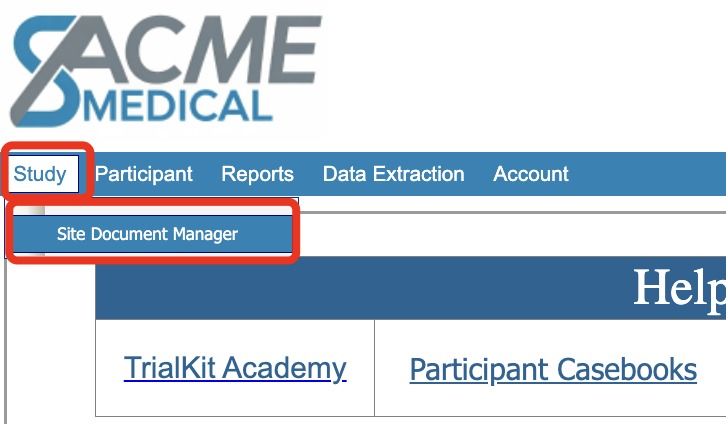
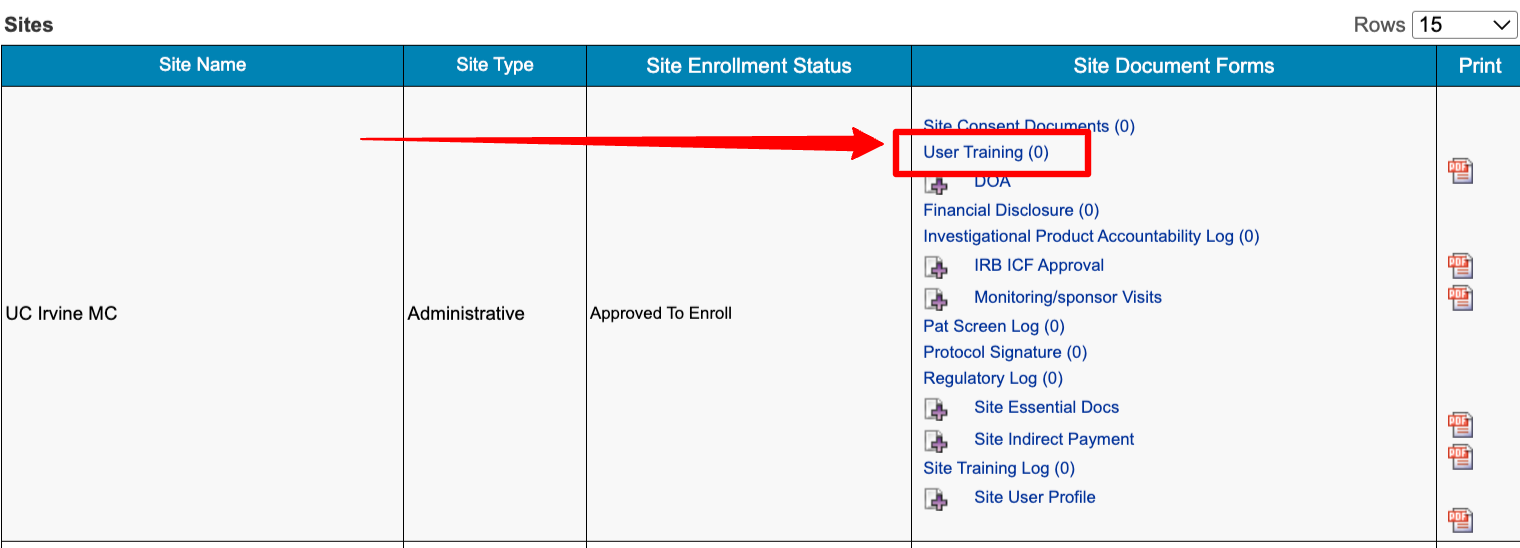
Look for the Training Log within your Site’s documents. The available forms at this level are study-dependent.
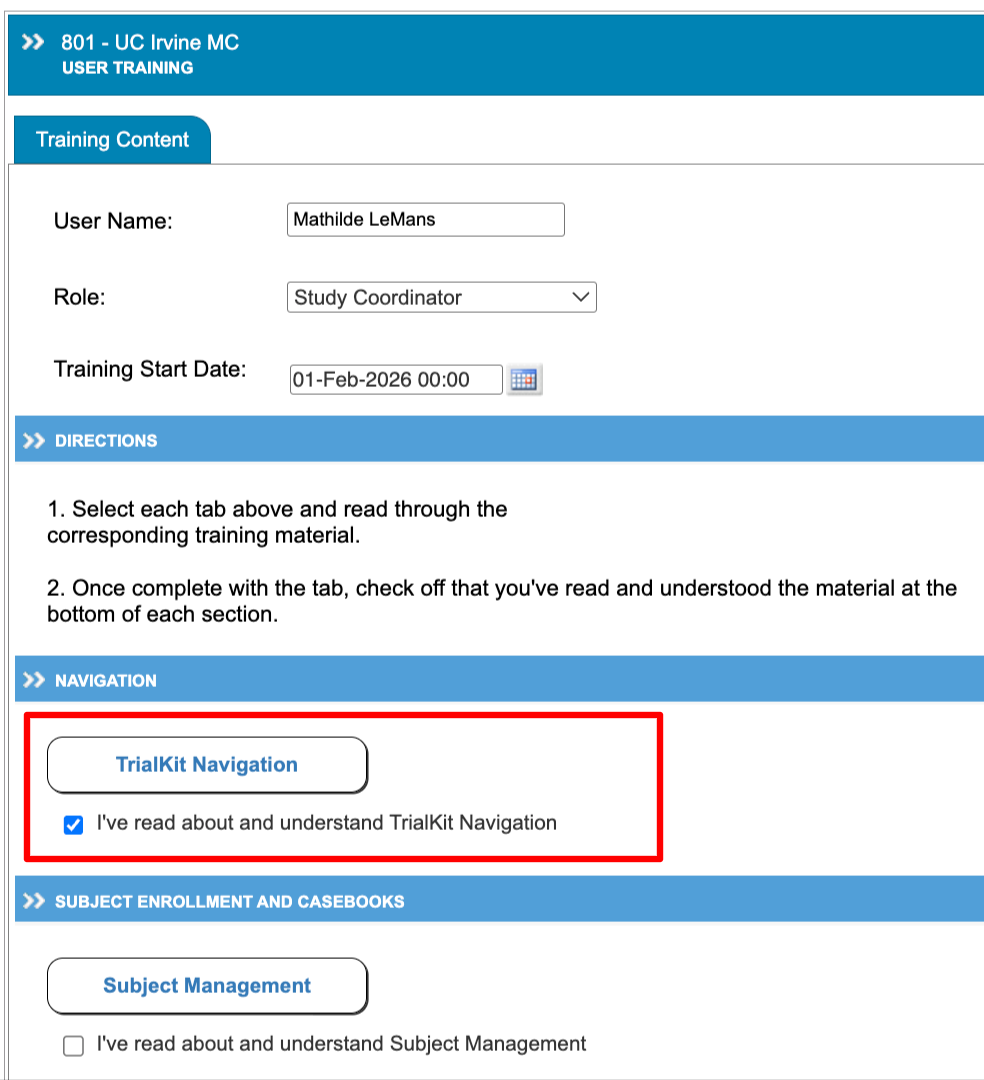
Go through each of the applicable links and indicate your understanding on each section.
Evaluation Sandboxes
Users who are looking to evaluate TrialKit and get hands-on a playground environment, but are not yet a Customer, have a great option to work with the TrialKit Services Team.
Due to the platform's many moving parts and different capabilities, independent sandbox environments can only be provided to existing customers who have gone through the TrialKit Academy training program.
As a solution to this purpose, CDS offers workshop-style meeting sessions, where Trainers will walk you through any part of the system you want to explore in a sandbox. This approach gives our team the opportunity to talk extensively about those functions and tie them directly to your objectives.
Think of it like an interactive demo where you are the guide and there are no limits to what we can do. In the end users walk away with accurate info and much more information than you would have by sandboxing on your own.
Training Sandboxes
Existing customers who wish to setup a Sandbox environment for Site Training purposes can do so at any time by using the Study Manager. However, this should be done with consideration of the following:
A copy of the study for this purpose is an okay approach - but over time will not match the live study due to changes introduced in one but not the other.
The alternative recommended solution is to use a general "Training" Admin site in the live study. The data will be like other admin/test data (not included in various exports/reports by default). Some study Administrators don't prefer this because the user could accidentally put data in the wrong site. That concern can be avoided by removing the training site access when the target user is later added to the live site.
User Accounts For Training Purposes
The way to manage a training environment is, in the actual study, set up a training site where the user (with their normal user account) logs in and does things in the training site just like they would in the main provider site later on. This approach also alleviates confusion and keeps things simple where each user has one login and can access reset links in their inbox.
User Accounts
Do not set up false user accounts. This creates issues and goes against acceptable use policies. Each user added to the system should have a single email account to log in with. Accounts should never be shared, and the person using an email to log in should have direct access to the inbox for that email. Deviating from these guidelines will weaken security and cause unnecessary troubleshooting issues with user account access.